
Skip to content

Payroll and Workforce Management

CynQ simplifies time tracking and payroll management for the construction industry. Employees record their hours directly on the jobsite using a GPS-enabled mobile time punch. Each hour is linked to the right project and task, then integrated into cost tracking. With flexible configuration for rates, trades, project types and overtime rules, CynQ helps you create more reliable timesheets, manage a rigorous approval process and export data to your payroll system.

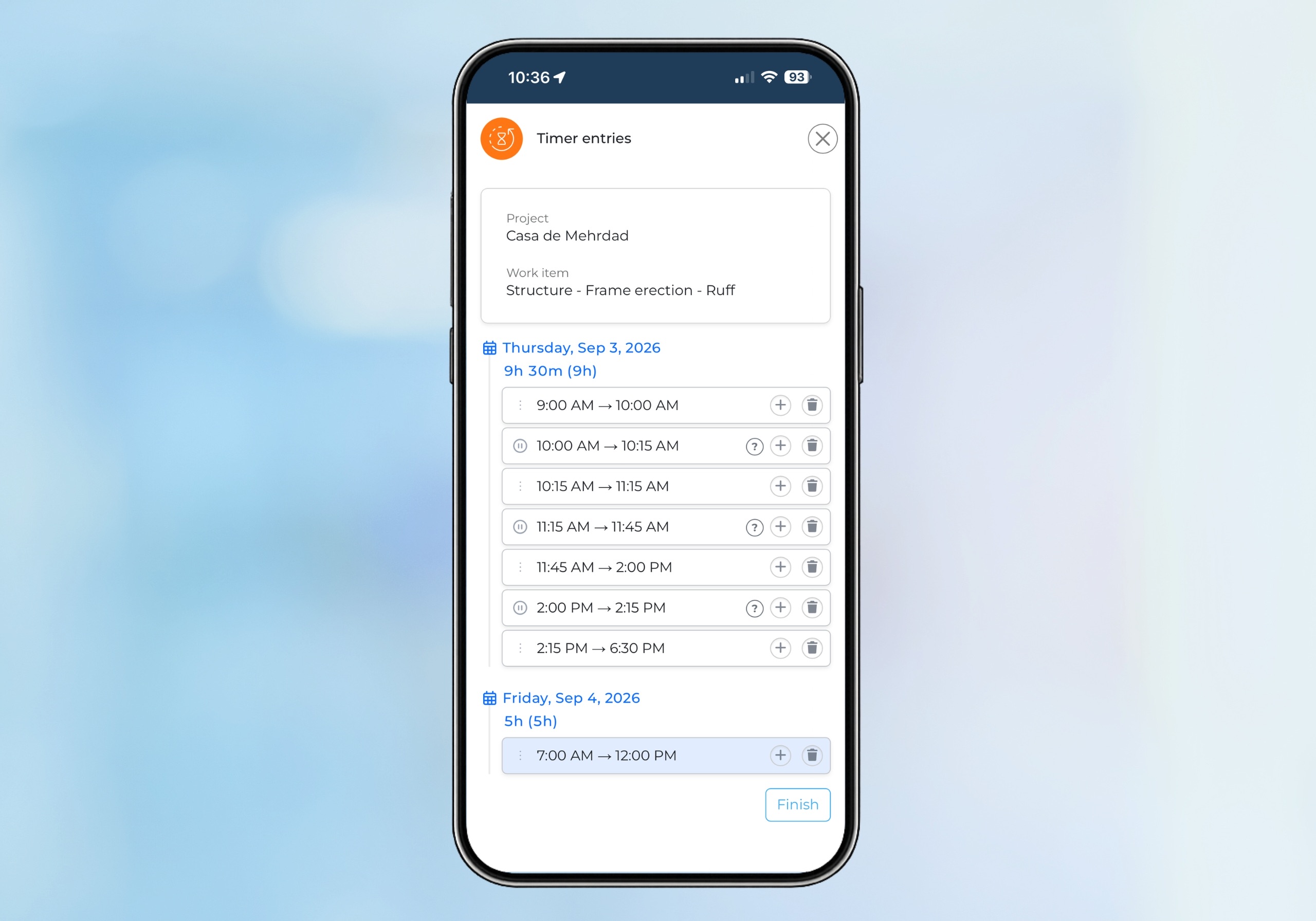
apercu écran punch mobile géolocalisé sur téléphone de CynQ
GPS-Enabled Mobile Time Punch

Capture Time Directly from the Jobsite

With CynQ, employees enter their hours directly from the jobsite using their mobile phone. With the GPS-enabled mobile time punch, they simply start the timer for the task they are working on. When a new task begins, the timer for the previous task stops automatically.

Reduce missed entries and errors while making time tracking easier.

  • Start and stop time directly from a task.
  • Manually edit time entries when needed.
  • Manage multiple tasks throughout the same day.
  • Timesheets based on actual hours worked.
  • Timesheet approval process before payroll export.
  • Time tracking for subcontractors, depending on your configuration.
gestionnaire de projet logiciel de construction CynQ
From Hours Worked to Actual Costs

Configure Rules for Your Projects and Teams

Payroll and compensation rules vary depending on the type of work. CynQ lets you configure the parameters that impact labor cost and overtime calculations based on project type, trade and skill level.

Configure CynQ to reflect the reality of your operations and compensation rules.

  • Hourly rates based on project type.
  • Different rates based on trade and skill level (apprentice, journeyperson and foreman).
  • Configure overtime thresholds and time bank eligibility.
  • Adapt settings to collective agreements, decrees and internal policies.
apercu écran pour punch mobile avec géolocalisation GPS
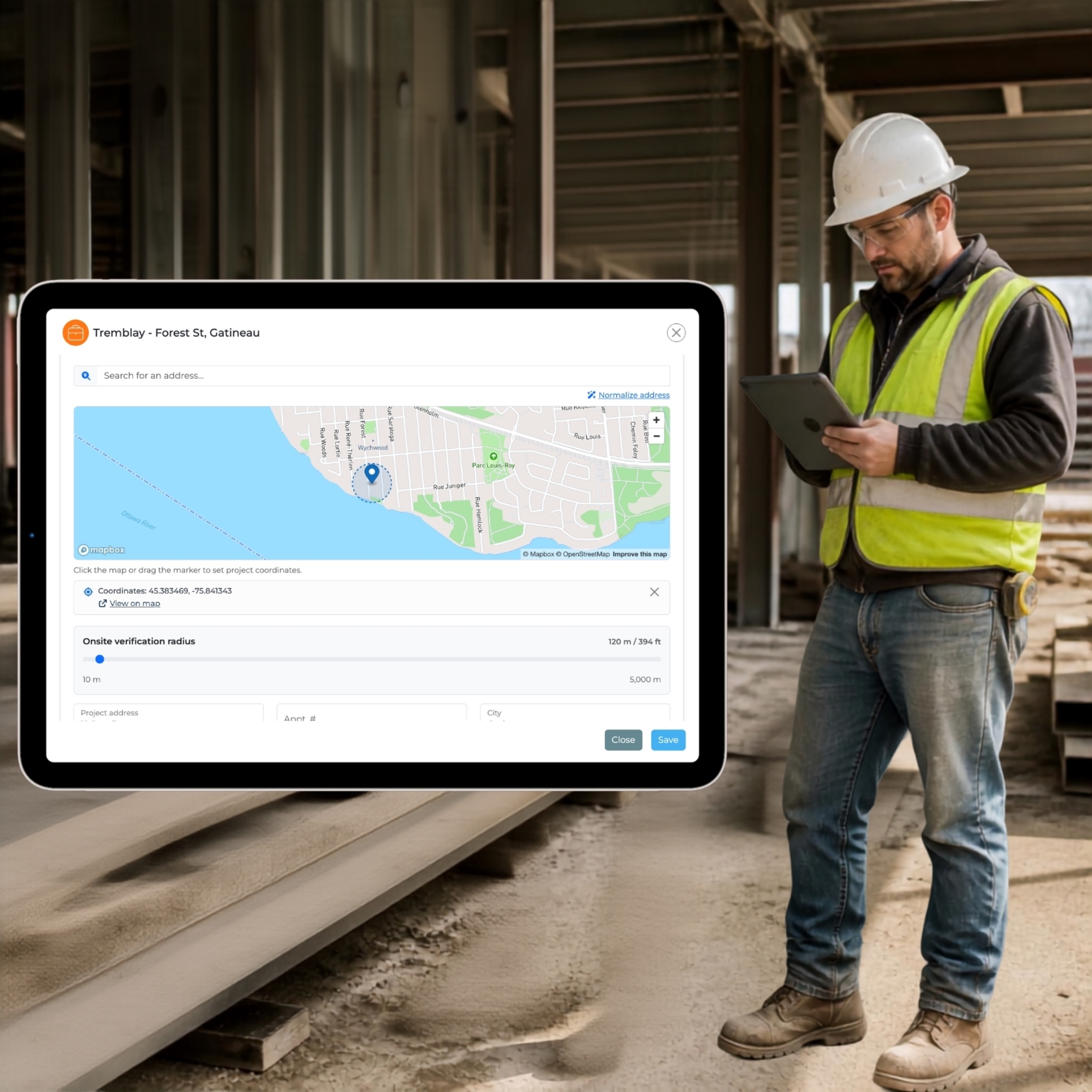
Validate Jobsite Presence

A Mobile Time Punch with a Configurable GPS Geofence

CynQ lets you define a GPS geofence around each project or jobsite to verify whether an employee is within the designated area when using the time punch to record or edit a time entry. This feature is not intended to track employee movements and does not record their exact location, nor the location of subcontractors.

Improve data reliability while maintaining control over your rules and settings.

  • Capture time directly from the jobsite using a GPS-enabled mobile time punch.
  • Configure a GPS geofence within which employees can clock in and out.
  • Identify entries made near or outside the established jobsite area.
  • Configure settings according to company policies and required consent.
  • Option to disable this feature for specific employees.
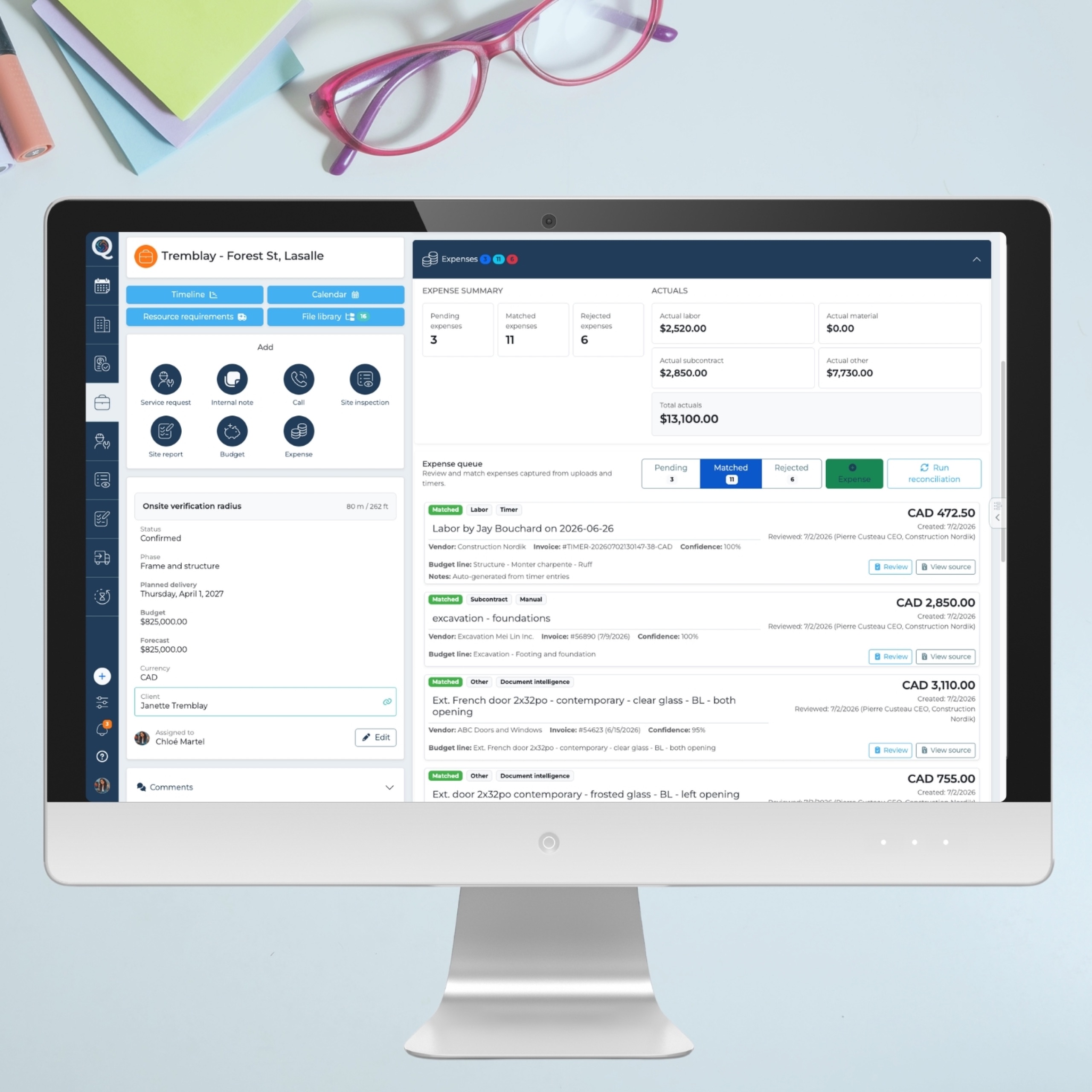
écran apercu budget avec dépenses main-d'oeuvre cynq
From Hours Worked to Actual Costs

Connect Labor Hours to Your Budget in Real Time

Every hour recorded in CynQ is linked to the right employee, task and project. CynQ transforms this data into actual labor costs and integrates it directly into budget tracking, allowing you to compare planned costs with actual costs and quickly identify variances.

Don’t just track hours worked. Understand what they really mean for your project.

  • Hours worked linked to projects and tasks.
  • Labor cost calculations based on configured rates.
  • Pay rates, cost rates and billing rates automatically determined based on trade, skill level and project type.
  • Time data directly available for budget tracking.
  • Identify variances when hours worked or skills used differ from planned resources, and measure their impact on project costs and budget
  • More accurate visibility into project profitability
travailleur de la construction utilisant son cellulaire pour le punch mobile de CynQ
From Employees to Subcontractors

Time Tracking Adapted to Your Teams

Time tracking isn’t limited to employees. Depending on your processes, CynQ can also be used to capture time for subcontractors when a task is assigned to them.

Track hours worked by both employees and subcontractors for a complete view of your labor costs.

  • Time tracking based on role and task type.
  • Track hours by project and task.
  • Better visibility into costs incurred on the jobsite.
  • One platform to centralize time data.
  • Simpler management and more reliable data.
From Time Worked to Actual Cost

Time and Payroll Management Built for Construction

With CynQ, every hour worked becomes reliable, actionable data—from jobsite time capture to payroll and cost tracking. With flexible payroll rules adapted to different project types and skill levels, CynQ helps you better control labor costs, monitor budgets and protect your margins.

Jobsite Time Tracking

Automate timesheet creation from hours captured directly on the jobsite.
Configurable Payroll Rules

Adapt rates, trades, project types and overtime rules to your operations

Reliable, Verifiable Data

Multi-level approval of time punches and timesheets helps prevent missed entries and errors.

Real-Time Budget Tracking

Hours worked are directly integrated into project costs for real-time visibility into budget performance.

Streamline Your Operations and Jobsite Management

Try CynQ for free and transform the way you build and manage your projects, internal teams, and subcontractors!
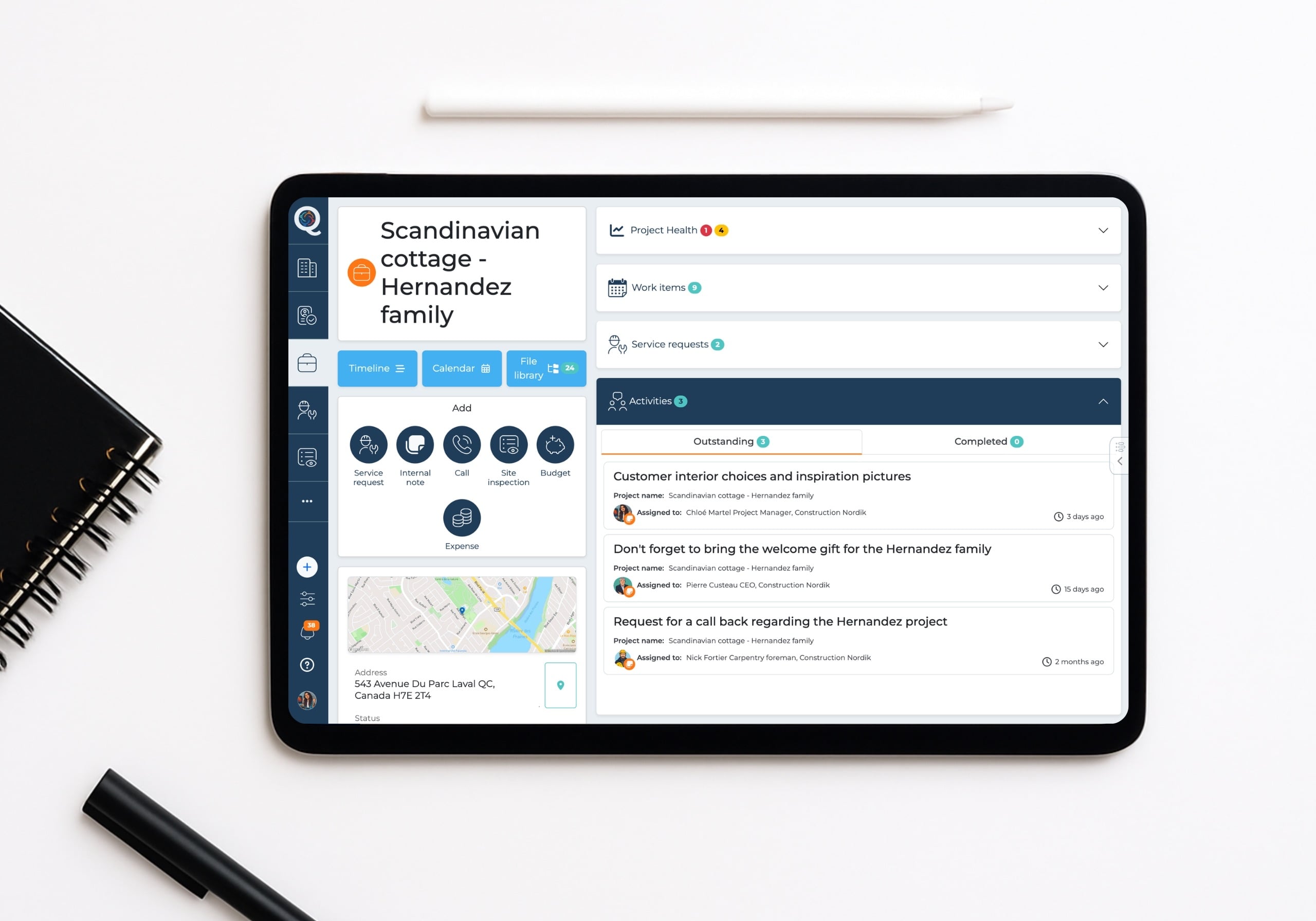
Aperçu de l'écran détail projet sur iPad logiciel CynQ
The benefits of CynQ

CynQ your ally to build better!

Rethink job site management to help contractors save time, reduce errors, and improve profitability. Plan, collaborate, track, and control your projects in real time.

CynQ simplifies your project management

With the integrated calendar and intuitive timeline, plan your projects with ease. Assign or move milestones with drag-and-drop, and adjust your project in real time as unexpected changes arise.

CynQ aligns your teams

Everyone knows what to do, shares the right documents, and works with the most up-to-date information—both in the office and on site.

CynQ follows you everywhere

Access all features whether you are in the office, on site, or on the go—from your phone, tablet, or computer.

CynQ adapts visibility by role

Each user only accesses the features and information that match their role.

CynQ keeps you informed in real time

Track changes, actions, and important updates as soon as they happen with notifications and reminders.

CynQ keeps your documents up to date

Plans, estimates, and photos are centralized so everyone works with the correct version. No more isolated Excel files, duplicates, and scattered data.

CynQ ensures complete traceability

Keep a clear record of the actions, decisions, and changes made to each project.

CynQ strengthens coordination and performance

Stay in control of your costs, schedules, and decisions—simply.